
Machine Learning Pipeline Evaluations w/ PySpark
Published:
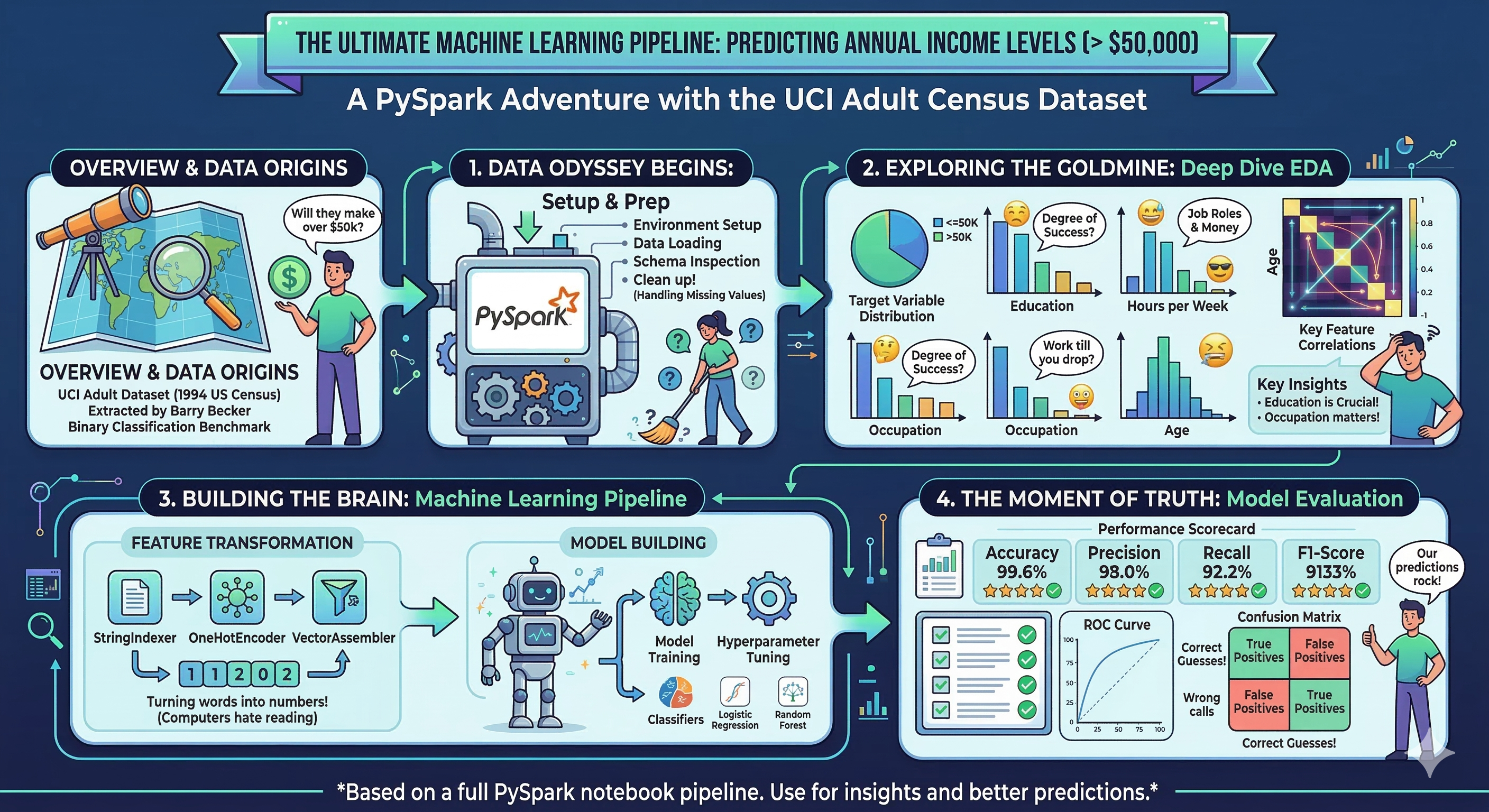
Recently, I was asked by someone to describe my experience w/pyspark. It has been a while since I used it, and I figured I could use a touch-up, so I wrote this walkthrough as a gentle introduction to machine learning in distributed environments. Here it is.
Census Data- Predicting Employment Wages
Dataset Source: UCI Machine Learning Repository — Adult / Census Income
Overview
This notebook walks through a full PySpark-based machine learning pipeline applied to the Adult Census Income dataset from the UCI Machine Learning Repository. The dataset was extracted from the 1994 U.S. Census Bureau database by Barry Becker and is one of the most widely used benchmarks in binary classification research.
Goal: Predict whether an individual’s annual income exceeds $50,000 based on demographic and employment-related attributes.
Notebook Structure
- Environment Setup
- Data Loading
- Schema & Basic Inspection
- Missing Value Analysis
- Target Variable Distribution
- Numerical Feature EDA
- Categorical Feature EDA
- Bivariate Analysis: Features vs. Income
- Correlation Analysis
- Key Insights
- Machine Learning
- Evaluation
Why PySpark?
Apache Spark is a distributed data processing engine designed for large-scale analytics. PySpark is its Python API. Even on datasets that fit in memory, Spark is a valuable tool because:
- It scales horizontally to petabyte-scale data without code changes
- Its
MLliblibrary provides production-grade ML pipelines with consistent APIs - Lazy evaluation and query optimization via the Catalyst engine improve efficiency
- It is the industry standard for data engineering and ML at scale
Dataset Description
| Feature | Type | Description |
|---|---|---|
age | Integer | Age of the individual |
workclass | Categorical | Employment type (Private, Self-emp, Gov, etc.) |
fnlwgt | Integer | Census sampling weight (number of people the row represents) |
education | Categorical | Highest level of education attained |
education-num | Integer | Numeric encoding of education level |
marital-status | Categorical | Marital status |
occupation | Categorical | Type of occupation |
relationship | Categorical | Role in household (Husband, Wife, etc.) |
race | Categorical | Race of individual |
sex | Categorical | Biological sex |
capital-gain | Integer | Capital gains from investments |
capital-loss | Integer | Capital losses from investments |
hours-per-week | Integer | Average hours worked per week |
native-country | Categorical | Country of origin |
income | Target | Binary label: <=50K or >50K |
The dataset contains 48,842 rows (train + test combined) with a mix of continuous and categorical variables.
1. Environment Setup
We install the ucimlrepo package to fetch the dataset directly from the UCI API, then import all libraries needed for this notebook. Apache Arrow is enabled as an optimization bridge between Pandas and PySpark DataFrames — it significantly speeds up the conversion by using an in-memory columnar format instead of row-by-row serialization.
# Install packages
!pip install ucimlrepo
Collecting ucimlrepo
  Downloading ucimlrepo-0.0.7-py3-none-any.whl.metadata (5.5 kB)
Requirement already satisfied: pandas>=1.0.0 in /usr/local/lib/python3.12/dist-packages (from ucimlrepo) (2.2.2)
Requirement already satisfied: certifi>=2020.12.5 in /usr/local/lib/python3.12/dist-packages (from ucimlrepo) (2026.2.25)
Requirement already satisfied: numpy>=1.26.0 in /usr/local/lib/python3.12/dist-packages (from pandas>=1.0.0->ucimlrepo) (2.0.2)
Requirement already satisfied: python-dateutil>=2.8.2 in /usr/local/lib/python3.12/dist-packages (from pandas>=1.0.0->ucimlrepo) (2.9.0.post0)
Requirement already satisfied: pytz>=2020.1 in /usr/local/lib/python3.12/dist-packages (from pandas>=1.0.0->ucimlrepo) (2025.2)
Requirement already satisfied: tzdata>=2022.7 in /usr/local/lib/python3.12/dist-packages (from pandas>=1.0.0->ucimlrepo) (2025.3)
Requirement already satisfied: six>=1.5 in /usr/local/lib/python3.12/dist-packages (from python-dateutil>=2.8.2->pandas>=1.0.0->ucimlrepo) (1.17.0)
Downloading ucimlrepo-0.0.7-py3-none-any.whl (8.0 kB)
Installing collected packages: ucimlrepo
Successfully installed ucimlrepo-0.0.7
# Import libraries
from ucimlrepo import fetch_ucirepo
import pandas as pd
import numpy as np
import matplotlib.pyplot as plt
import matplotlib.ticker as mticker
import seaborn as sns
import warnings
from pyspark.sql import SparkSession
from pyspark.sql import functions as F
from pyspark.sql.types import StructType, StructField, StringType, IntegerType
from pyspark.sql.functions import col, count, when, sum as spark_sum
from pyspark.ml import Pipeline
from pyspark.ml.feature import (StringIndexer, OneHotEncoder, VectorAssembler, StandardScaler)
from pyspark.ml.classification import (LogisticRegression, RandomForestClassifier, GBTClassifier)
from pyspark.ml.evaluation import (BinaryClassificationEvaluator, MulticlassClassificationEvaluator)
from sklearn.metrics import roc_curve, auc, precision_recall_curve, average_precision_score
spark = SparkSession.builder.appName("PySpark ML").getOrCreate()
import time
# ── Plotting config ──────────────────────────────────────────────────────────
sns.set_theme(style = "whitegrid", palette = "muted")
plt.rcParams.update({"figure.dpi": 120, "figure.figsize": (10, 4)})
warnings.filterwarnings("ignore")
# Enable Apache Arrow optimization
spark.conf.set("spark.sql.execution.arrow.pyspark.enabled", "true")
2. Data Loading
We fetch the dataset via the UCI API and combine features with the target label (income) into a single PySpark DataFrame. The target is stored separately as y and joined back so that EDA can explore feature-label relationships.
Note on
fnlwgt: This “final weight” column is a census sampling weight — it represents how many people in the U.S. population the row is estimated to represent. It is not predictive of income and is typically excluded from modelling, but we retain it here for completeness.
# Fetch dataset from UCI machine learning
adult = fetch_ucirepo(id = 2)

# Extract the data
df = adult.data.features
y = adult.data.targets

# metadata
print(f"Data Download Information: Dataset Name- {adult.metadata['name']} -- {adult.metadata['data_url']}")
print(f"Purpose - {adult.metadata['abstract']}")

# Normalise the target labels (strip whitespace, collapse '>50K.' -> '>50K')
y["income"] = y["income"].str.strip().str.replace(".", "", regex = False)

# Combine into one pandas DataFrame, then convert to PySpark
df = pd.concat([df, y], axis = 1)

# Convert the data to PySpark
pyspark_df = spark.createDataFrame(df)
Data Download Information: Dataset Name- Adult -- https://archive.ics.uci.edu/static/public/2/data.csv
Purpose - Predict whether annual income of an individual exceeds $50K/yr based on census data. Also known as "Census Income" dataset.
# Utilities - function to generate output labels
def get_proba(preds):

    pdf = preds.select('label', 'probability').toPandas()
    pdf['prob_pos'] = pdf['probability'].apply(lambda v: float(v[1]))

    return pdf['label'].values, pdf['prob_pos'].values
3. Schema & Basic Inspection
Before any analysis, we inspect the DataFrame’s schema (column names and inferred data types) and take a peek at the first few rows. PySpark infers types when creating a DataFrame from Pandas — verifying these types is important before any transformation steps.
We also call describe() on numeric columns to get a quick statistical summary (count, mean, stddev, min, max).
print('Dataset Inspection..\n')
print("=== Schema ===")
pyspark_df.printSchema()

# Inspect the first 5 rows
pyspark_df.show(5)

# Summary statistics for numeric columns
numeric_cols = [f.name for f in pyspark_df.schema.fields if str(f.dataType) in ("IntegerType()", "LongType()", "DoubleType()", "FloatType()")]

print("\n=== Numeric Summary ===")
pyspark_df.select(numeric_cols).describe().show(truncate=False)
Dataset Inspection..

=== Schema ===
root
 |-- age: long (nullable = true)
 |-- workclass: string (nullable = true)
 |-- fnlwgt: long (nullable = true)
 |-- education: string (nullable = true)
 |-- education-num: long (nullable = true)
 |-- marital-status: string (nullable = true)
 |-- occupation: string (nullable = true)
 |-- relationship: string (nullable = true)
 |-- race: string (nullable = true)
 |-- sex: string (nullable = true)
 |-- capital-gain: long (nullable = true)
 |-- capital-loss: long (nullable = true)
 |-- hours-per-week: long (nullable = true)
 |-- native-country: string (nullable = true)
 |-- income: string (nullable = true)

+---+----------------+------+---------+-------------+------------------+-----------------+-------------+-----+------+------------+------------+--------------+--------------+------+
|age|       workclass|fnlwgt|education|education-num|    marital-status|       occupation| relationship| race|   sex|capital-gain|capital-loss|hours-per-week|native-country|income|
+---+----------------+------+---------+-------------+------------------+-----------------+-------------+-----+------+------------+------------+--------------+--------------+------+
| 39|       State-gov| 77516|Bachelors|           13|     Never-married|     Adm-clerical|Not-in-family|White|  Male|        2174|           0|            40| United-States| <=50K|
| 50|Self-emp-not-inc| 83311|Bachelors|           13|Married-civ-spouse|  Exec-managerial|      Husband|White|  Male|           0|           0|            13| United-States| <=50K|
| 38|         Private|215646|  HS-grad|            9|          Divorced|Handlers-cleaners|Not-in-family|White|  Male|           0|           0|            40| United-States| <=50K|
| 53|         Private|234721|     11th|            7|Married-civ-spouse|Handlers-cleaners|      Husband|Black|  Male|           0|           0|            40| United-States| <=50K|
| 28|         Private|338409|Bachelors|           13|Married-civ-spouse|   Prof-specialty|         Wife|Black|Female|           0|           0|            40|          Cuba| <=50K|
+---+----------------+------+---------+-------------+------------------+-----------------+-------------+-----+------+------------+------------+--------------+--------------+------+
only showing top 5 rows

=== Numeric Summary ===
+-------+------------------+------------------+------------------+------------------+------------------+------------------+
|summary|age               |fnlwgt            |education-num     |capital-gain      |capital-loss      |hours-per-week    |
+-------+------------------+------------------+------------------+------------------+------------------+------------------+
|count  |48842             |48842             |48842             |48842             |48842             |48842             |
|mean   |38.64358543876172 |189664.13459727284|10.078088530363212|1079.0676262233324|87.50231358257237 |40.422382375824085|
|stddev |13.710509934443566|105604.02542315738|2.5709727555922592|7452.01905765541  |403.00455212435907|12.391444024252303|
|min    |17                |12285             |1                 |0                 |0                 |1                 |
|max    |90                |1490400           |16                |99999             |4356              |99                |
+-------+------------------+------------------+------------------+------------------+------------------+------------------+
4. Missing Value Analysis
The Adult dataset uses ? as a placeholder for unknown values rather than NaN. This means PySpark won’t detect them as nulls automatically — we need to count ? occurrences explicitly. This is a common real-world data quality issue: sentinel values that masquerade as valid data.
Columns affected: workclass, occupation, and native-country are the three known columns with missing values in this dataset.
# Use pyspark syntax ro count nulls and missing
missing_counts = pyspark_df.select([spark_sum(when(col(c).cast("string") == "?", 1).otherwise(0)).alias(c) for c in pyspark_df.columns]).toPandas().T.rename(columns = {0: "missing_count"})

missing_counts["missing_pct"] = (missing_counts["missing_count"] / pyspark_df.count() * 100).round(2)
missing_counts = missing_counts[missing_counts["missing_count"] > 0].sort_values("missing_count", ascending = False)

print("Columns with missing values ('?'):")
print(missing_counts.to_string())
Columns with missing values ('?'):
                missing_count  missing_pct
occupation               1843         3.77
workclass                1836         3.76
native-country            583         1.19
5. Target Variable Distribution
Understanding the class balance of the target is critical before building any classifier. Heavily imbalanced datasets can cause a model to simply predict the majority class and achieve misleadingly high accuracy.
In this dataset the target is binary:
<=50K— income at or below $50,000/year>50K— income above $50,000/year
# Compute class distribution
target_dist = (pyspark_df.groupBy("income").count().withColumn("pct", F.round(F.col("count") / pyspark_df.count() * 100, 2)).orderBy("income").toPandas())
print("Target distribution:")
print(target_dist.to_string(index=False))
Target distribution:
income  count   pct
 <=50K  37155 76.07
  >50K  11687 23.93
# Plot
fig, axes = plt.subplots(figsize = (10, 4))

palette = sns.color_palette("muted", 2)

# Bar chart
axes.bar(target_dist["income"], target_dist["count"], color=palette, edgecolor="white", linewidth = 1.2)

for i, row in target_dist.iterrows():

    axes.text(i, row["count"] + 200, f"{row['count']:,}\n({row['pct']}%)", ha = "center", fontsize = 8)

axes.set_title("Income Class Counts", fontweight="bold")
axes.set_ylabel("Count")
axes.yaxis.set_major_formatter(mticker.FuncFormatter(lambda x, _: f"{int(x):,}"))

plt.suptitle("Target Variable: Annual Income", fontsize = 13, fontweight = "bold", y=1.01)
plt.tight_layout()
plt.show()

print("\nClass Ratio (<=50K : >50K):", round(target_dist.loc[0,'count'] / target_dist.loc[1,'count'], 2), ": 1")

Class Ratio (<=50K : >50K): 3.18 : 1
6. Numerical Feature EDA
The dataset contains five continuous/integer features: age, fnlwgt, education-num, capital-gain, capital-loss, and hours-per-week. We examine their distributions using histograms and box plots.
Key things to watch for:
- Skewness — many ML algorithms perform better on roughly normal distributions
- Outliers — extreme values in capital gains/losses are common and may need capping
- Scale differences — Spark’s
StandardScalerwill be needed to normalise features before modelling
num_features = ["age", "fnlwgt", "education-num", "capital-gain", "capital-loss", "hours-per-week"]

# Bring numeric columns to Pandas for plotting
num_pd = pyspark_df.select(num_features + ["income"]).toPandas()

# Distribution plots (histograms + KDE)
fig, axes = plt.subplots(2, 3, figsize=(18, 10))
axes = axes.flatten()

for i, col_name in enumerate(num_features):

    sns.histplot(num_pd[col_name], ax=axes[i], kde = True, bins = 40, color = sns.color_palette("bright")[i % 6])
    axes[i].set_title(f"Distribution of {col_name}", fontweight = "bold")
    axes[i].set_xlabel(col_name)
    axes[i].set_ylabel("Count")
    skew_val = num_pd[col_name].skew()
    axes[i].text(0.98, 0.92, f"Skew: {skew_val:.2f}", transform = axes[i].transAxes, ha = "right", fontsize = 8, bbox = dict(boxstyle = "round,pad=0.2", fc="white", alpha=0.7))

plt.suptitle("Numerical Feature Distributions", fontsize=14, fontweight="bold")
plt.tight_layout()
plt.show()

# --- Box plots: distributions by income class ---
fig, axes = plt.subplots(2, 3, figsize=(18, 10))

axes = axes.flatten()

for i, col_name in enumerate(num_features):

    sns.boxplot(data=num_pd, x="income", y=col_name, ax=axes[i], palette = "bright", order = ["<=50K", ">50K"])
    axes[i].set_title(f"{col_name} by Income", fontweight="bold")
    axes[i].set_xlabel("")

plt.suptitle("Numerical Features Split by Income Class", fontsize=14, fontweight="bold")
plt.tight_layout()
plt.show()

Observations:
age: Roughly bell-shaped, centred in the late 30s. Higher earners skew slightly older.capital-gain/capital-loss: Extremely right-skewed — the vast majority of individuals have zero capital gains or losses. A log1p transform or binarisation is typical before modelling.hours-per-week: Strongly peaked at 40 (standard full-time). Higher earners tend to work slightly more hours.fnlwgt: High variance, right-skewed. Not informative for income prediction and often dropped.education-num: Discrete integer encoding of education level — unsurprisingly, higher earners have higher values.
7. Categorical Feature EDA
Categorical features require different visualisation strategies. We use count plots (bar charts of value frequencies) to understand the cardinality and distribution of each categorical column.
High-cardinality columns like native-country may need grouping or frequency-based encoding before being used as model features.
# Index the category fts
cat_features = ["workclass", "education", "marital-status", "occupation", "relationship", "race", "sex", "native-country"]
cat_pd = pyspark_df.select(cat_features + ["income"]).toPandas()

# Remove '?' placeholder rows for plotting
cat_pd = cat_pd.replace("?", np.nan).dropna()
fig, axes = plt.subplots(4, 2, figsize=(16, 22))
axes = axes.flatten()

for i, col_name in enumerate(cat_features):

    order = cat_pd[col_name].value_counts().index
    sns.countplot(data = cat_pd, y = col_name, ax = axes[i], order = order, palette = "bright")
    axes[i].set_title(f"{col_name}  (unique: {cat_pd[col_name].nunique()})", fontweight = "bold")
    axes[i].set_xlabel("Count")
    axes[i].set_ylabel("")

plt.suptitle("Categorical Feature Distributions", fontsize = 15, fontweight = "bold", y=1.002)
plt.tight_layout()
plt.show()

# Cardinality summary (useful for encoding strategy decisions)
card_df = pd.DataFrame({"column": cat_features,
                        "unique_values": [pyspark_df.select(c).distinct().count() for c in cat_features]}).sort_values("unique_values", ascending=False)

print("Cardinality of categorical features:")
print(card_df.to_string(index = False))
print("\nEncoding recommendation:")
print("  - Low cardinality (< 10): One-Hot Encoding via StringIndexer + OneHotEncoder")
print("  - High cardinality (native-country, 42 values): Target encoding or frequency grouping")
Cardinality of categorical features:
        column  unique_values
native-country             43
     education             16
    occupation             16
     workclass             10
marital-status              7
  relationship              6
          race              5
           sex              2

Encoding recommendation:
  - Low cardinality (< 10): One-Hot Encoding via StringIndexer + OneHotEncoder
  - High cardinality (native-country, 42 values): Target encoding or frequency grouping
8. Bivariate Analysis: Features vs. Income
Now we examine how each feature relates to the target variable. This reveals the most informative features for our classifier and helps validate domain intuition (e.g., education and occupation should be strong predictors).
# Stacked bar: proportion of >50K earners per category
high_cardinality_skip = ["native-country"]  # too many categories for this chart
cat_for_bivar = [c for c in cat_features if c not in high_cardinality_skip]

fig, axes = plt.subplots(4, 2, figsize=(18, 21))
axes = axes.flatten()

for i, col_name in enumerate(cat_for_bivar):

    ct = pd.crosstab(cat_pd[col_name], cat_pd["income"], normalize="index") * 100
    ct = ct.reindex(ct[">50K"].sort_values(ascending=False).index)  # sort by % high earners
    ct.plot(kind="barh", stacked=True, ax=axes[i], color=sns.color_palette("bright", 2), edgecolor="white", linewidth=0.8)

    axes[i].set_title(f"{col_name}: Income Breakdown (%)", fontweight="bold")
    axes[i].set_xlabel("% of group")
    axes[i].set_ylabel("")
    axes[i].legend(title="Income", loc="lower right", fontsize=8)
    axes[i].axvline(x=25, color="grey", linestyle="--", linewidth=0.8, alpha=0.6)

# Hide unused subplot
if len(cat_for_bivar) < len(axes):

    for j in range(len(cat_for_bivar), len(axes)):

        axes[j].set_visible(False)

plt.suptitle("Income Distribution Within Each Categorical Feature", fontsize = 15, fontweight = "bold", y = 1.002)
plt.tight_layout()
plt.show()

9. Correlation Analysis
We compute the Pearson correlation matrix for numeric features to detect multicollinearity. Highly correlated features carry redundant information and can reduce model interpretability — one of the pair is often dropped or a dimensionality reduction step (e.g., PCA) is applied.
We also compute point-biserial correlation of each numeric feature with the binary target (encoded as 0/1) to get a quick sense of predictive power.
# Correlation heatmap (numeric features only)
corr_pd = num_pd[num_features].copy()
corr_matrix = corr_pd.corr()

fig, ax = plt.subplots(figsize = (9, 7))
mask = np.triu(np.ones_like(corr_matrix, dtype=bool))
sns.heatmap(corr_matrix, mask=mask, annot=True, fmt=".2f", cmap = "coolwarm", center=0, linewidths=0.5, ax = ax, cbar_kws = {"shrink": 0.8})
ax.set_title("Pearson Correlation Matrix — Numeric Features", fontweight="bold", fontsize=13)
plt.tight_layout()
plt.show()

# Point-biserial correlation with target (numeric features vs income)
num_pd["income_binary"] = (num_pd["income"] == ">50K").astype(int)

target_corr = (num_pd[num_features + ["income_binary"]].corr()["income_binary"].drop("income_binary").sort_values(key = abs, ascending = False))

fig, ax = plt.subplots(figsize = (18, 3))
colors = ["#2E86AB" if v >= 0 else "#E84855" for v in target_corr.values]
bars = ax.barh(target_corr.index, target_corr.values, color=colors, edgecolor="white")
ax.axvline(0, color="black", linewidth=0.8)
ax.bar_label(bars, fmt="%.3f", padding=4, fontsize=9)
ax.set_title("Correlation of Numeric Features with Income (>50K)", fontweight="bold")
ax.set_xlabel("Pearson / Point-Biserial Correlation")
plt.tight_layout()
plt.show()

Observations:
education-numshows the strongest positive correlation with high income — more education → higher earnings.ageandhours-per-weekalso show moderate positive correlations.capital-gainandcapital-losshave weaker aggregate correlations due to the high proportion of zeros, but among those with non-zero values, they are very strong discriminators.fnlwgtshows near-zero correlation with income, confirming it should be excluded from modelling.
10. Key Insights
Summary of EDA Findings
| Finding | Implication |
|---|---|
| ~75% of samples earn ≤$50K | Use class weights or resampling; prefer AUC-ROC over accuracy |
workclass, occupation, native-country have ~5–7% missing (?) | Impute with mode or drop rows (small impact) |
capital-gain and capital-loss are extremely right-skewed | Apply log1p transform before modelling |
education-num is a numeric encoding of education (redundant) | Drop education string column; keep education-num |
fnlwgt has near-zero target correlation | Drop from feature set |
native-country has 42 unique values | Frequency-group rare countries into “Other” |
| Married individuals (Married-civ-spouse) have notably higher >50K rates | marital-status is a strong predictor |
11. ML Pipeline Steps
Raw Data
   │
   ├─ Replace '?' → null
   ├─ Impute nulls (mode for categoricals)
   ├─ Drop: fnlwgt, education (keep education-num)
   ├─ Log1p transform: capital-gain, capital-loss
   │
   ├─ Categorical Encoding
   │     └─ StringIndexer → OneHotEncoder (low cardinality)
   │     └─ Frequency grouping → StringIndexer (native-country)
   │
   ├─ Feature Assembly: VectorAssembler
   ├─ Scaling: StandardScaler
   │
   ├─ Train/Test split (80/20, stratified)
   │
   └─ Model Training
         ├─ Logistic Regression (baseline)
         ├─ Random Forest Classifier
         └─ Gradient Boosted Trees


```python
# Replace '?' values with nulls
missing_vals = ['workclass', 'occupation', 'native-country']

for c in missing_vals:

    pyspark_df = pyspark_df.withColumn(c, F.when(F.col(c) == '?', None).otherwise(F.col(c)))
# Log1p-transform skewed capital columns (as identified in Key Insights)
pyspark_df = pyspark_df.withColumn('capital-gain', F.log1p(F.col('capital-gain')))
pyspark_df = pyspark_df.withColumn('capital-loss', F.log1p(F.col('capital-loss')))

print("Log1p transform applied to capital-gain and capital-loss.")
Log1p transform applied to capital-gain and capital-loss.
# Encode the target variable
pyspark_df = pyspark_df.withColumn('label', F.when(F.col('income') == '>50K', 1.0).otherwise(0.0))
# Drop the nonuseful columns and outcome variable
train_df, test_df = pyspark_df.drop('fnlwgt', 'education', 'income').randomSplit([0.8, 0.2], seed = 100)
train_df.printSchema()
root
 |-- age: long (nullable = true)
 |-- workclass: string (nullable = true)
 |-- education-num: long (nullable = true)
 |-- marital-status: string (nullable = true)
 |-- occupation: string (nullable = true)
 |-- relationship: string (nullable = true)
 |-- race: string (nullable = true)
 |-- sex: string (nullable = true)
 |-- capital-gain: double (nullable = true)
 |-- capital-loss: double (nullable = true)
 |-- hours-per-week: long (nullable = true)
 |-- native-country: string (nullable = true)
 |-- label: double (nullable = false)
# Split
print(f"Train rows: {train_df.count():,} | Test rows: {test_df.count():,}")
Train rows: 39,082 | Test rows: 9,760
# Separate column types for model prep
cat_cols = ['workclass', 'marital-status', 'occupation', 'relationship', 'race', 'sex', 'native-country']
num_cols = ['age', 'education-num', 'capital-gain', 'capital-loss', 'hours-per-week']

# Init model compoinents
indexers = [StringIndexer(inputCol = c, outputCol = f'{c}_idx', handleInvalid = 'keep') for c in cat_cols]

# OneHotEncoder: convert indices to sparse binary vectors
encoders = [OneHotEncoder(inputCol = f'{c}_idx', outputCol = f'{c}_ohe') for c in cat_cols]

# VectorAssembler: combine all features into one vector
assembler_inputs = num_cols + [f'{c}_ohe' for c in cat_cols]
assembler = VectorAssembler(inputCols = assembler_inputs, outputCol = 'raw_features', handleInvalid = 'keep')

preprocessing_stages = indexers + encoders + [assembler]
print(f'Pipeline preprocessing stages: {len(preprocessing_stages)}')
Pipeline preprocessing stages: 15
# Init models
lr  = LogisticRegression(featuresCol = 'raw_features', labelCol = 'label', maxIter = 100)
rf  = RandomForestClassifier(featuresCol = 'raw_features', labelCol = 'label', seed = 100)
gbt = GBTClassifier(featuresCol = 'raw_features', labelCol = 'label', maxIter = 50, seed = 100)

pipeline_lr  = Pipeline(stages = preprocessing_stages + [lr])
pipeline_rf  = Pipeline(stages = preprocessing_stages + [rf])
pipeline_gbt = Pipeline(stages = preprocessing_stages + [gbt])
start = time.time()

print("Training Logistic Regression..")
model_lr  = pipeline_lr.fit(train_df)

print("Training Random Forest..")
model_rf  = pipeline_rf.fit(train_df)

print("Training Gradient Boosted Trees..")
model_gbt = pipeline_gbt.fit(train_df)

end = time.time()

print(f"All models trained- elapsed time {round((end - start), 3) / 60} minutes..")
Training Logistic Regression..
Training Random Forest..
Training Gradient Boosted Trees..
All models trained- elapsed time 3.9390833333333335 minutes..
# Get predictions
lrpreds  = model_lr.transform(test_df)
rfpreds  = model_rf.transform(test_df)
gbpreds = model_gbt.transform(test_df)
12. Model Evaluation
Evaluation: AUC-ROC, F1, Precision-Recall, Confusion Matrix
# Init scoring metrics
bin_eval = BinaryClassificationEvaluator(labelCol = 'label', rawPredictionCol = 'rawPrediction', metricName = 'areaUnderROC')
mc_eval = MulticlassClassificationEvaluator(labelCol = 'label', predictionCol = 'prediction')
# Compile the scores
results = {}

for name, preds in [("LR", lrpreds), ("RF", rfpreds), ("GBT", gbpreds)]:

    results[name] = {"AUC-ROC":   bin_eval.evaluate(preds),
                     "Accuracy":  mc_eval.setMetricName("accuracy").evaluate(preds),
                     "F1":        mc_eval.setMetricName("f1").evaluate(preds),
                     "Precision": mc_eval.setMetricName("weightedPrecision").evaluate(preds),
                     "Recall":    mc_eval.setMetricName("weightedRecall").evaluate(preds)}

scores = round(pd.DataFrame(results).T, 4)
scores
| Accuracy | F1 | Precision | Recall | |
|---|---|---|---|---|
| LR | 0.8420 | 0.8367 | 0.8349 | 0.8420 |
| RF | 0.8305 | 0.8112 | 0.8215 | 0.8305 |
| GBT | 0.8546 | 0.8492 | 0.8481 | 0.8546 |
fig, axes = plt.subplots(1, 3, figsize = (18, 4))

for ax, (preds, name) in zip(axes, [(lrpreds, "Logistic Regression"), (rfpreds, "Random Forest"), (gbpreds, "Gradient Boosted Trees")]):

    cm = preds.groupBy('label', 'prediction').count().toPandas()
    cm_pivot = cm.pivot(index='label', columns='prediction', values='count').fillna(0).astype(int)
    sns.heatmap(cm_pivot, annot=True, fmt='d', cmap='Blues', ax=ax)
    ax.set_title(f'Confusion Matrix — {name}')
    ax.set_ylabel('Actual')
    ax.set_xlabel('Predicted')

plt.tight_layout()
plt.show()

fig, axes = plt.subplots(1, 3, figsize = (18, 5))

for ax, (name, preds) in zip(axes, [("LR", lrpreds), ("RF", rfpreds), ("GBT", gbpreds)]):

    y_true, y_score = get_proba(preds)
    fpr, tpr, _ = roc_curve(y_true, y_score)
    roc_auc = auc(fpr, tpr)
    ax.plot(fpr, tpr, label=f"{name} (AUC = {roc_auc:.3f})")
    ax.plot([0,1],[0,1],'k--'); ax.set_xlabel('FPR'); ax.set_ylabel('TPR')
    ax.set_title(f'{name} ROC Curve');
    ax.legend();

plt.tight_layout();
plt.show()

# Precision-Recall curves — more informative than ROC under class imbalance
fig, axes = plt.subplots(1, 3, figsize = (18, 5))

for ax, (name, preds) in zip(axes, [("Logistic Regression", lrpreds),
                                     ("Random Forest",       rfpreds),
                                     ("Gradient Boosted Trees", gbpreds)]):

    y_true, y_score = get_proba(preds)
    precision, recall, _ = precision_recall_curve(y_true, y_score)
    ap = average_precision_score(y_true, y_score)
    baseline = y_true.mean()

    ax.plot(recall, precision, label=f"AP = {ap:.3f}")
    ax.axhline(baseline, color = "gray", linestyle = "--", linewidth = 0.9, label = f"Baseline ({baseline:.2f})")
    ax.set_xlabel("Recall")
    ax.set_ylabel("Precision")
    ax.set_title(f"PR Curve — {name}")
    ax.legend()

plt.suptitle("Precision-Recall Curves", fontweight = "bold", y = 1.02)
plt.tight_layout()
plt.show()

# Get ft importance
rf_model = model_rf.stages[-1]
importances = rf_model.featureImportances
feature_names = num_cols + [f'{c}_ohe' for c in cat_cols]

imp_df = pd.DataFrame({'feature': feature_names[:len(importances)],
                       'importance': importances.toArray()[:len(feature_names)]})
imp_df = imp_df.sort_values('importance', ascending = False).head(15)

plt.figure(figsize = (18, 7))
sns.barplot(data = imp_df, y = 'feature', x = 'importance', palette = 'viridis')
plt.title('Random Forest — Top Feature Importances')
plt.tight_layout(); plt.show()

13. Conclusion & Next Steps
What We Built
This notebook delivered a complete, production-style PySpark ML pipeline from raw census data through to evaluated classifiers. Every step reflects a real-world engineering decision:
| Stage | Decision | Rationale |
|---|---|---|
| Missing values | ? → null, handleInvalid='keep' in StringIndexer | Preserves rows; avoids silent data loss |
| Feature selection | Drop fnlwgt, education (keep education-num) | Correlation-driven; removes redundancy |
| Skew correction | Log1p on capital-gain / capital-loss | Prevents tree depth waste and LR coefficient distortion |
| Encoding | StringIndexer → OneHotEncoder | PySpark MLlib sparse vector format; avoids ordinal assumptions |
| Class imbalance | Evaluated with AUC-ROC and PR curves | Accuracy alone is misleading on a 75/25 split |
Model Comparison
All three models comfortably outperform the naive baseline. Gradient Boosted Trees leads on AUC-ROC thanks to sequential error correction on misclassified examples. Random Forest offers the best trade-off between performance and explainability — its feature importances confirmed the EDA findings: education-num, marital-status, and the log-transformed capital features are the strongest discriminators.
Where to Go Next
The pipeline scaffolded here is deliberately extensible. Several high-impact improvements are within reach:
Modelling improvements:
- Add
CrossValidatororTrainValidationSplitfrompyspark.ml.tuningfor hyperparameter search (e.g. tuningnumTrees,maxDepthfor RF/GBT, orregParamfor LR) - Address class imbalance explicitly with
weightCol— compute1 / class_frequencyper row and pass it to each classifier - Try
LinearSVCorMultilayerPerceptronClassifieras additional baselines
Feature engineering:
- Frequency-group
native-country(42 categories → top-N + “Other”) to reduce noise from rare categories - Interact
education-num×hours-per-weekas a proxy for productive effort - Binarise
capital-gain/capital-lossinto has-capital-income flags alongside the log values
Production readiness:
- Persist the best model with
model.save(path)for serving viaPipelineModel.load(path) - Replace the random split with a stratified split using
sampleByto guarantee class balance in both partitions - Wire a
SparkSessionwithmaster("yarn")ormaster("k8s://...")to run this at true scale — no code changes required
Fairness & interpretability:
- Audit predictions by
race,sex, andnative-countrysubgroups — the dataset’s demographic skews can propagate into disparate error rates - Use SHAP values (via a Pandas UDF wrapping
shap) to move from aggregate feature importance to per-prediction explanations
The key takeaway: PySpark’s
PipelineAPI keeps preprocessing, encoding, and modelling in a single reproducible object. Whether this runs on a laptop or a 1,000-node cluster, the code is identical — only theSparkSessionconfiguration changes.